Overview
The Corporate Portal is the main workspace where HR managers and benefit administrators manage employee access, approvals, cancellations, and company settings.
But the portal also plays another important role: it supports employee activation.
For the benefit to create business value, employees need to receive the company landing page, sign up, and start using their membership.
This means HR managers are not only managing employees, they are also a key part of the activation journey.
Here we have two connected workstreams inside the Corporate Portal:
Activation growth: making the employee signup landing page easier to find and share.
Core portal usability: making employee management clearer, more scalable, and less error-prone.
TL;DR: Key results
- 2.7x increase in landing page shares compared to the previous Account Page placement.
- 1,012+ shares in 19 days compared to a historical average of around 300 monthly shares.
- 419 copies from 249 users in approximately 2.5 weeks after placing the activation banner in the HR workflow.
The challenges
The Corporate Portal have two critical jobs: helping HR admins manage employees and helping companies activate employees. However, both areas had friction.
On the activation side, the employee signup link was not visible enough in the HR admin’s daily workflow. The team had considered creating a dedicated onboarding page, but capacity was limited and we needed a faster way to test whether better guidance could increase sharing behavior.
On the employee-management side, the portal structure did not always match how HR admins expected to work.
Employees with upcoming cancellations were still active, but they appeared in a separate tab. This created confusion because, from the HR perspective, those employees were still active until their end date.
The opportunity was to improve both sides of the portal: make activation easier to trigger, while making daily employee management clearer and more reliable.
My role
I worked on UX strategy, product thinking, interaction design, UI design, and handoff across several Corporate Portal improvements.
My role was to identify friction in the HR admin journey, connect those findings to business and customer needs, and propose solutions that could be shipped within team capacity.
I collaborated with Product, Engineering, CX, and Growth stakeholders to shape solutions that balanced speed, impact, and long-term scalability.
1: Increasing activation
Contextual activation
One idea on the table was to create a dedicated onboarding page for HR admins.
While this could have created a more complete guided experience, it also required more time and development capacity. There was also a product risk: a new page would become another destination users had to discover.
Given the team’s limited capacity, I proposed a faster and more contextual alternative: bringing the activation moment directly into the Employees page, where HR admins were already working.
The hypothesis was simple:
If HR admins need to share the employee sign up landing page, the most effective place to surface that action is inside their daily employee-management workflow.
Activation banner
We introduced a activation banner on the Employees page.
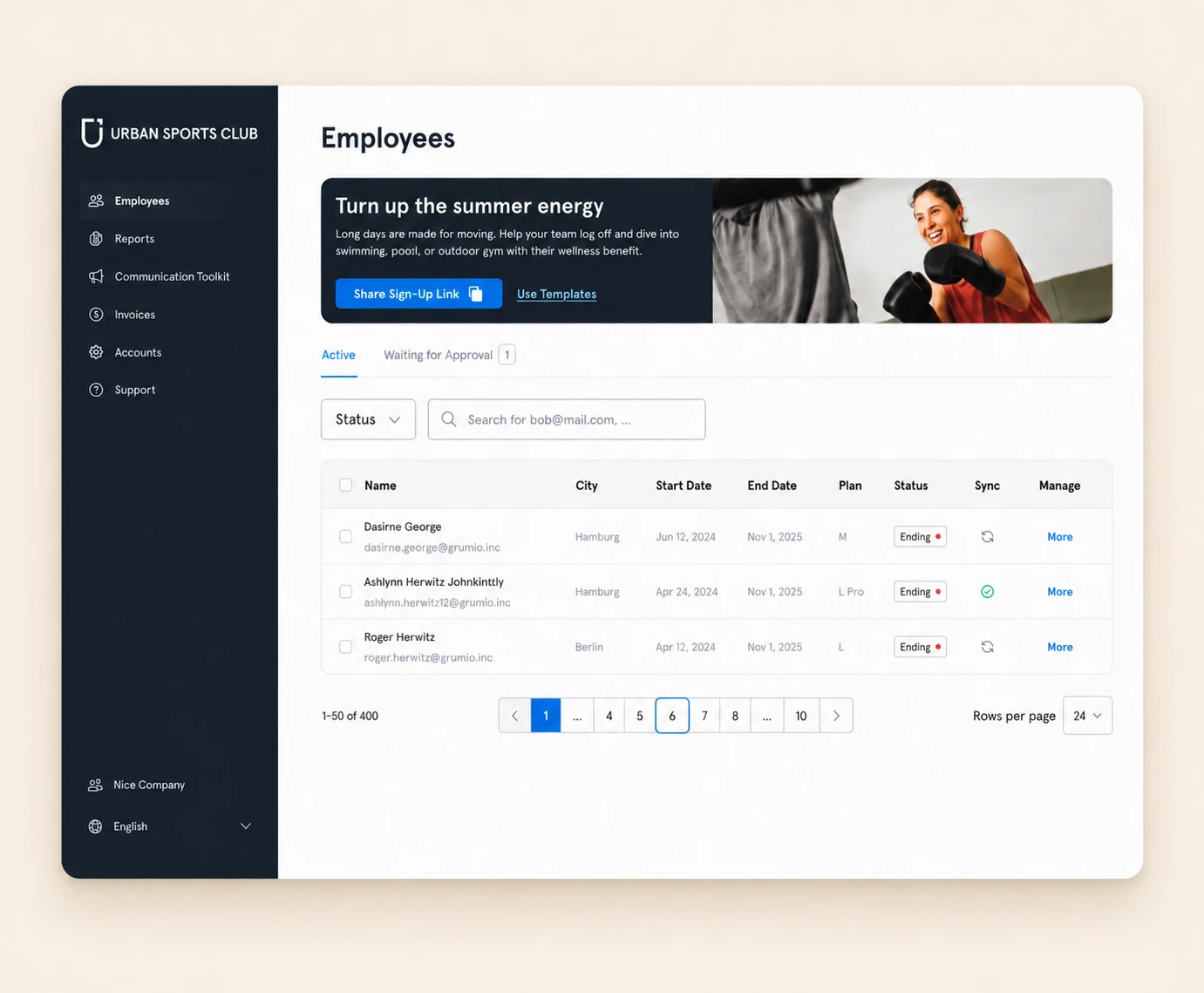
The banner kept the company landing page visible and easy to copy, reducing the need for HR admins to search for the signup link elsewhere in the portal.
This turned the Employees page from a purely administrative area into a more active activation surface.
The result was a 2.7x increase in landing page shares compared to the previous Account Page placement - under the account page (screenshot below).
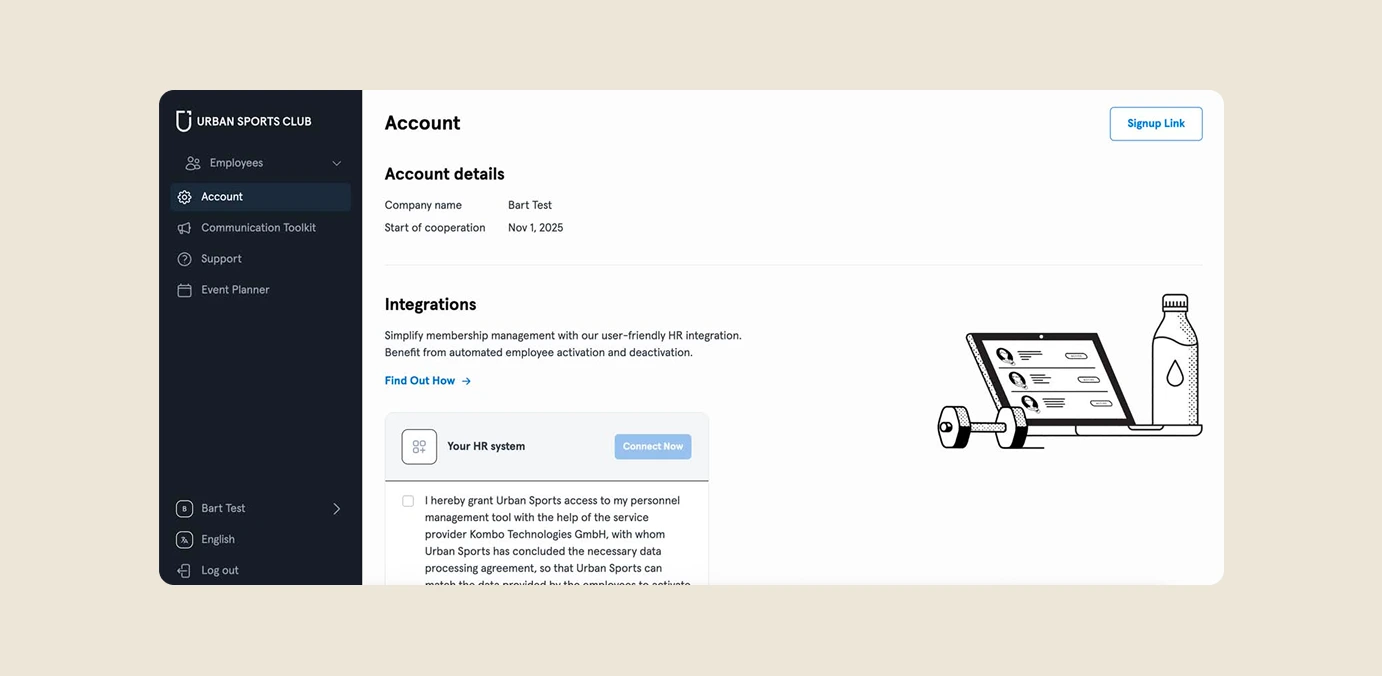
In approximately 2.5 weeks, the banner generated 419 copies from 249 users. This helped shift the sharing baseline from around 300 monthly shares to 1,012+ shares in 19 days.
This validated the decision to prioritize a lightweight contextual solution over a heavier onboarding page as the first step.
Cold start guidance
To support first-time users, we also added cold start guidance through a lateral pop-up.
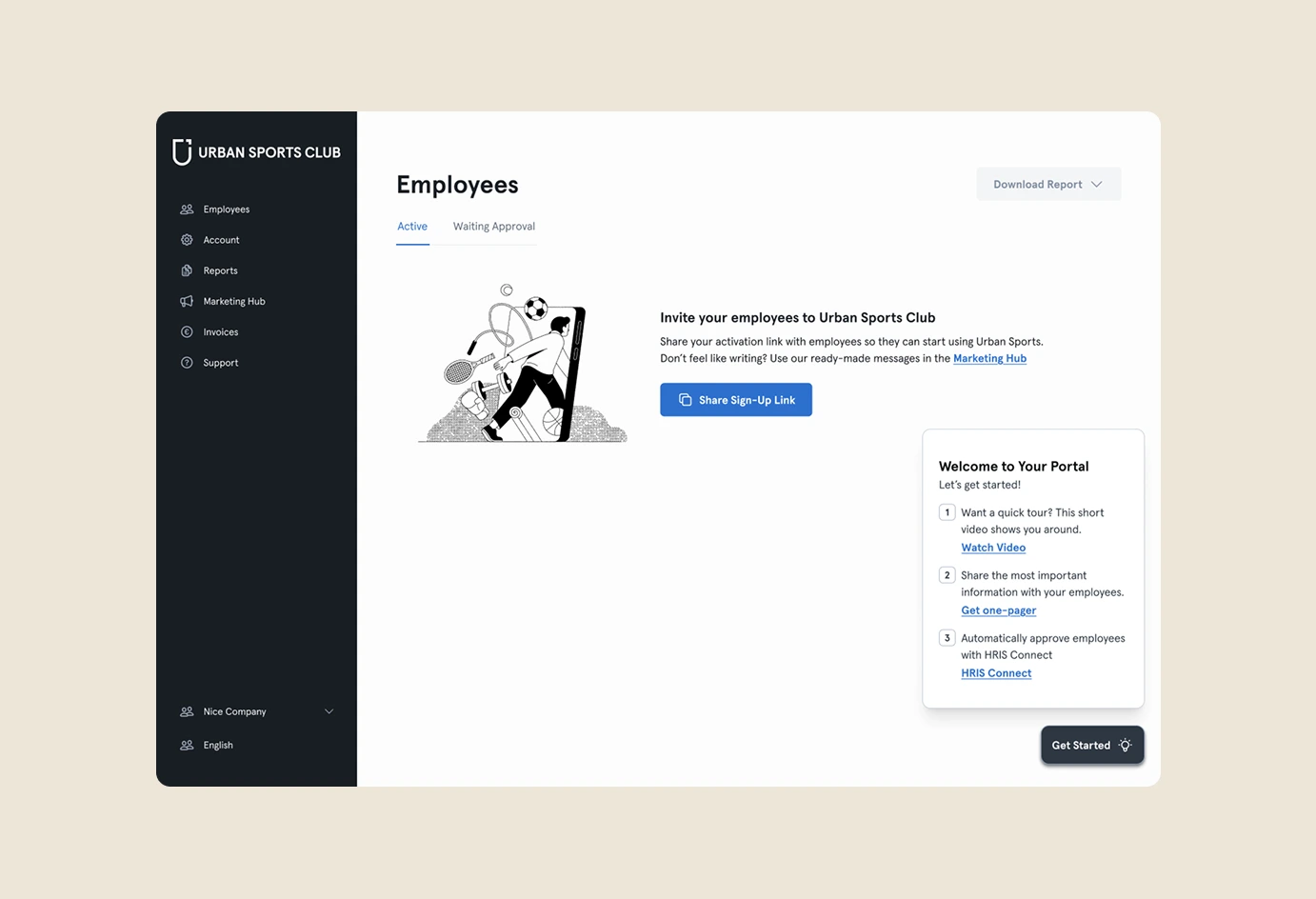
This helped HR admins understand what to do next when arriving in the portal, especially in the early setup moment when they may not yet know how to activate employees.
The goal was not to create a long onboarding flow, but to provide just enough guidance at the moment it was needed.
Together, the banner and cold start guidance created a lightweight activation layer inside the HR workflow.
2: Improving core portal usability
While the activation work focused on increasing sign up-link sharing, a second stream of work focused on improving the portal’s core administrative experience.
These improvements were not activation features directly. They addressed customer confusion, reduced operational friction, and made the Employees page easier to understand and scale.
Replacing a confusing tab with scalable status filters
Previously, the Employees page had a separate Upcoming Cancellations tab.
The problem was that employees with upcoming cancellations were still active until their end date. Moving them into a separate tab created a mismatch between the system structure and the HR admin’s mental model.
From the HR perspective, if an employee still had access, they expected to find that employee in the Active list.
The intended solution was to remove the Upcoming Cancellations tab and move those employees back into the Active tab, while introducing status filters so HR admins could still find specific cases like upcoming cancellations.
This created a clearer model:
Active employees stay in the Active tab.
Specific conditions are handled through status filters.
The result was a cleaner and more scalable structure, reducing the need to create new tabs for every edge case.
Clarifying employee status logic
The status work also helped create a more complete and consistent model for how employees appear in the portal.
Instead of relying only on tabs to communicate employee state, the interface could now support more nuanced statuses such as Active, Paused, Starting Soon, Ending, Pending Approval, and Cancelled.
This made the page more flexible and better prepared for future product needs.
Making duplicated employees visible in Pending Approval
Another improvement focused on duplicated employees in the Pending Approval flow.
This issue mainly affected companies using HRIS integrations. An employee could be synced from the HRIS and also register manually with a different email, creating a second pending profile.
This created a risk for HR admins: they could approve or reject the wrong profile without realizing there was a duplicate.
To address this quickly, we introduced a lightweight first-pass solution: a Duplicate badge in the pending list and a notification indicator on the Pending Approval tab.
This gave HR admins immediate visibility into potential duplicates, while keeping the scope manageable.
The fuller prevention flow could still be implemented later if the issue became more widespread, but the first release already reduced ambiguity and helped users identify the problem faster.
Impact
The clearest quantitative impact came from the activation work.
The activation banner generated a 2.7x increase in landing page shares compared to the previous Account Page placement. In approximately 2.5 weeks, it generated 419 copies from 249 users, helping move the portal from a historical average of around 300 monthly shares to 1,012+ shares in 19 days.
The broader portal data also showed that the Corporate Portal is a meaningful activation channel, influencing employee signups and contributing to business value.
The usability improvements had a different type of impact.
By removing the Upcoming Cancellations tab and introducing status filters, the Employees page became clearer, more aligned with the HR admin mental model, and more scalable for future statuses. The X% adoption rate among companies with upcoming cancellations helped validate that the new filter-based model preserved discoverability while reducing navigation complexity.
By making duplicated employees visible in Pending Approval, the portal became safer and less error-prone for companies using HRIS integrations.
Together, these initiatives improved both sides of the Corporate Portal experience: activation growth and day-to-day employee management.
Learning: improving rollout alignment with CX
One important learning came from the Upcoming Cancellations rollout.
The tab removal went live before the status filters were available. This meant that some companies suddenly lost the familiar place where they expected to find employees with upcoming cancellations, which led several customers to contact the CX team.
This was not the ideal rollout experience. Even though the long-term product direction was right, the communication and release sequencing were not aligned well enough with the customer-facing teams.
As a result, I created a dedicated communication channel between the Growth team and CX, who act as the bridge with companies. This gave me more ownership over customer-facing release communication and helped ensure that future portal changes were better explained before they reached customers.
This changed how I think about product impact. A good solution is not only about the final design. It also depends on how the change is introduced, communicated, and supported by the teams closest to the customer.